
Day to day
Orders & delivery
Every order the agent takes, from draft to delivered — with the courier booked in one click when yours is integrated, and a clean manual path when it isn't.
The life of an order
- Draft
The agent has the items, name, phone and address, and has quoted the exact total — prices re-read live from your store at this moment, never from memory. The customer has not said yes yet.
- Confirmed (COD)
The customer confirms; the order is created — in Shopify if connected (tagged
wsend, stock decremented, your delivery charge as a shipping line), otherwise in WSend. Nothing was typed by you. - Awaiting advance → verification
If your payment rules asked for money up front, the order waits for the transfer instead. The customer's slip screenshot goes to your verification queue; on approval the real order is created. Unpaid advance orders expire on their own after 36 hours (with a reminder along the way).
- Booked
The courier has the parcel — the tracking number is on the order and the customer has been told.
The Orders page
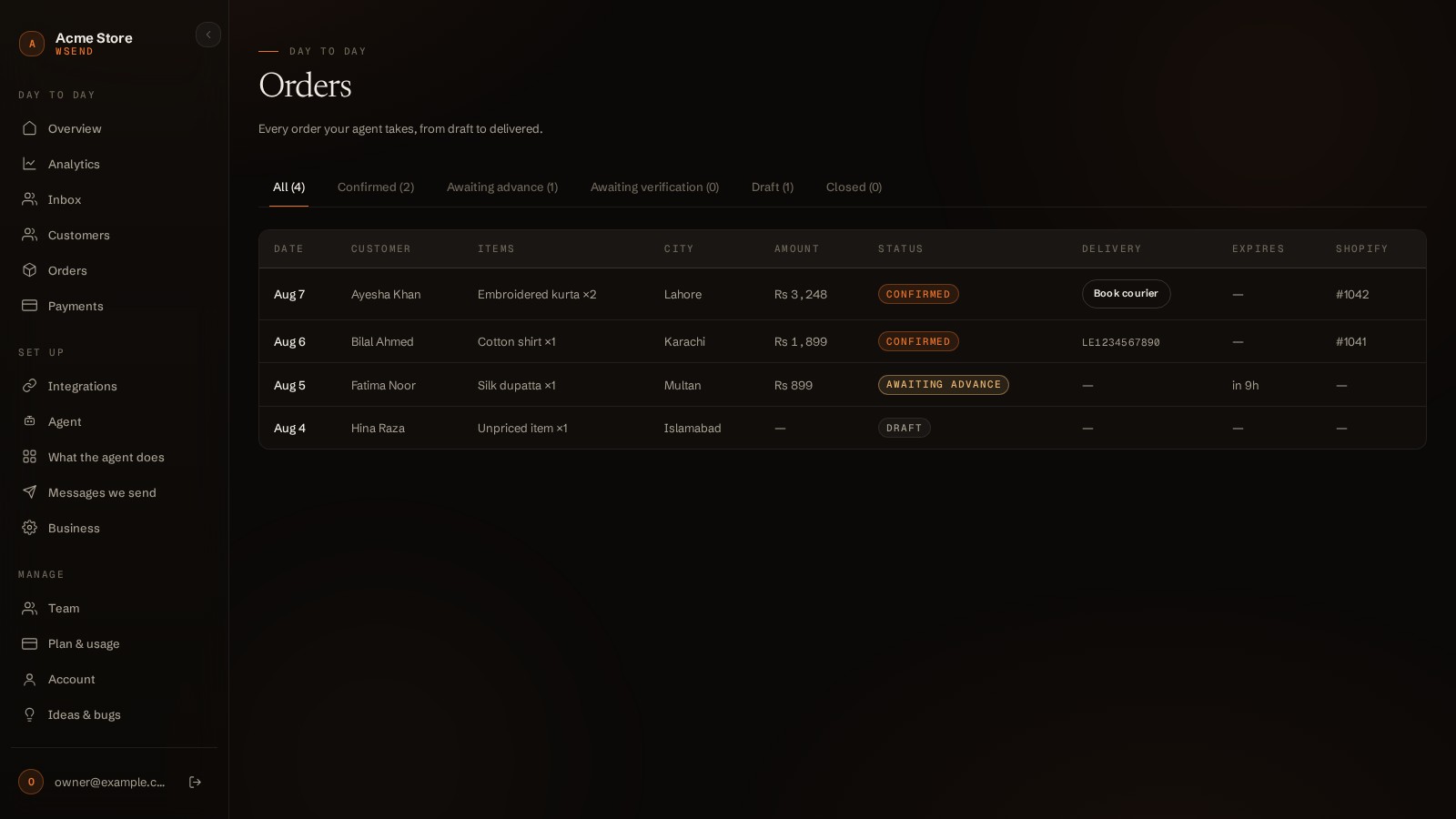
| Status | Meaning |
|---|---|
| Confirmed | A real order exists. If delivery is not booked yet, the row shows the button. |
| Awaiting advance | Waiting for the customer's transfer; the Expires column counts down. |
| Awaiting verification | A slip arrived — it is in your payment queue. |
| Draft | Still being put together in chat. |
| Expired / Cancelled | Closed without shipping — expired advances land here on their own. |
Booking the courier
On any confirmed order the Delivery column shows Book courier:
- Integrated courier (Leopards today, in Pakistan): one click books the parcel — destination city matched against the courier's own list, the COD amount set to the order total minus any staff-verified advance — and the tracking number appears in the row.
- Everyone else — the manual path: book with whatever courier you actually use, then enter the tracking number in the same spot and press Save. The customer is notified with the tracking number either way.
- If an integrated booking is refused, the row falls back to the manual field and shows the courier's reason — you are never stuck.
Addresses are checked before anything ships
Every address the agent collects is validated — rules first (long enough? has a house number? a city you actually serve?), then geographic checks against Google's data, routed by your primary market. A weak address is politely questioned in chat; after two failed fixes your risk rules can demand an advance instead, so a fake address costs the customer, not you. A validation outage never blocks an order — checks fail open.
Website orders
Orders from your Shopify website appear alongside chat orders and get the same address check. A website order whose address fails the check is flagged — and when that customer is already on your WhatsApp, the agent asks them for the full address before anything ships. The automations in Messages we send confirm the order and send delivery updates on WhatsApp.
Good to know
- In Shopify, chat orders carry the tag
wsend— filter on it to see exactly what WSend sold. - An order's amount is frozen in its own currency at the moment it was taken — later price or currency changes never rewrite an old order.
- The customer's booked-parcel message (with the tracking number) sends only while their 24-hour window is open — see Messages we send for how templates cover the rest.